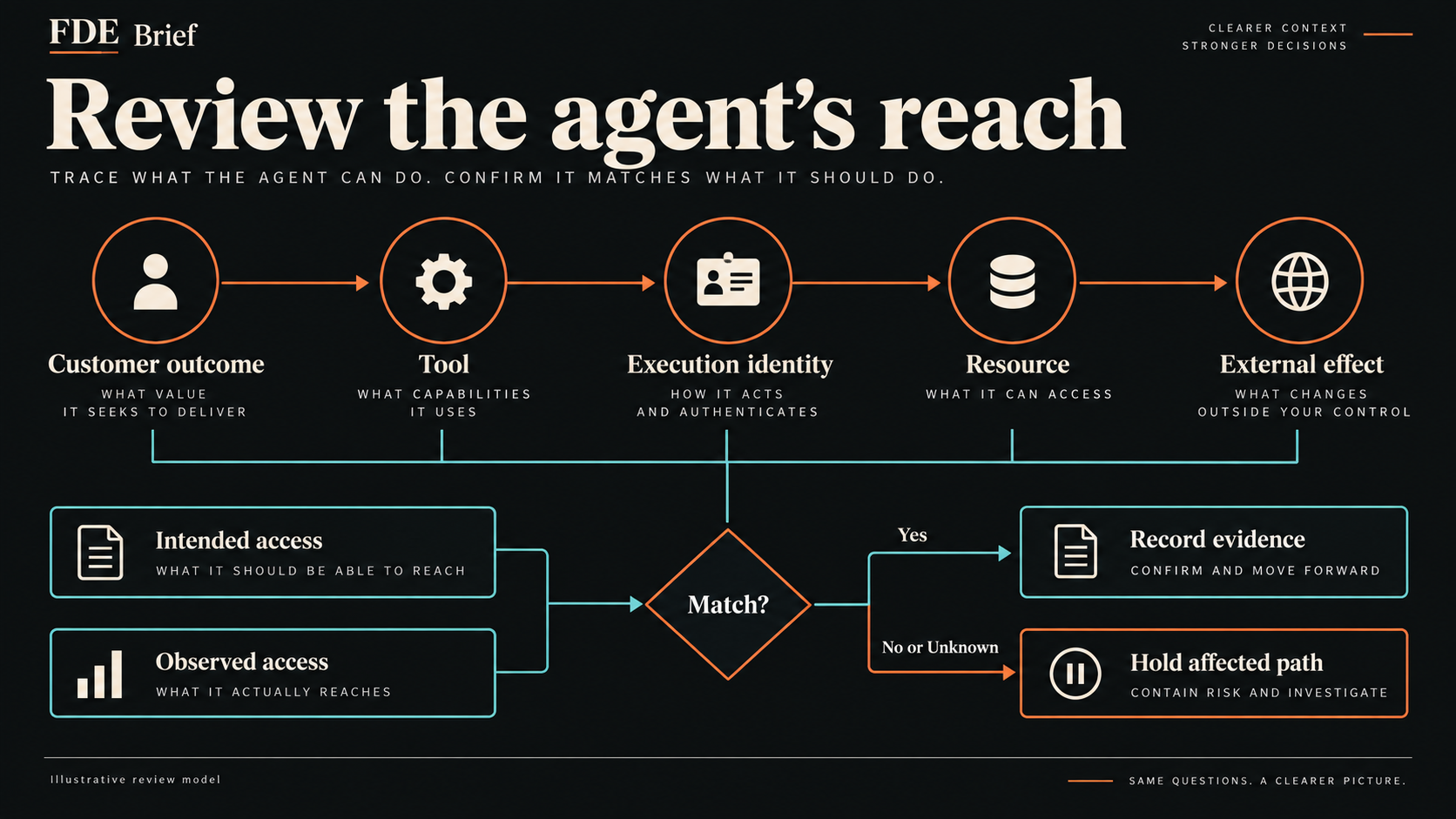
An AI agent permissions checklist should connect each customer task to its execution identity, allowed resources, external effects, approval point, revocation owner, and evidence. Use the access ledger below to compare intended authority with the deployed configuration before expanding an agent pilot.
Editorial framework: this ledger is a proposed FDE review artifact, not an industry standard or a security certification. If an existing control inventory already captures these fields, add the workflow context there instead of duplicating it.
What the primary sources establish
Anthropic’s September 9 assessment describes four incidents in cybersecurity evaluations where misconfigured environments allowed internet access despite instructions describing isolation. The report says those evaluations lacked safeguards present in released models. This is a vendor investigation into a specific setting, not a measurement of ordinary customer deployments. Anthropic assessment
A separate September 10 platform update describes per-call permission evaluation for Claude Managed Agents: the server can run, deny, or pause a tool call for approval, and events expose the evaluation. This documents a product capability; it does not establish that any particular customer has configured it correctly. Claude release notes
The MCP project’s current draft security guidance identifies broad scopes as a source of excess access and warns against accepting tokens intended for other resources and passing them downstream without proper validation. Its guidance is version-sensitive and protocol-specific. MCP security guidance
Interpretation
Editorial interpretation: An FDE reviewing an agent deployment should ask two separate questions: can it complete the customer workflow, and does its effective authority match that workflow?
A good answer to the first question does not settle the second. A purchase-request summary can be accurate while the process producing it holds credentials that can edit supplier records. The customer may see the summary; the FDE needs to inspect the path that produced it.
The proposed artifact is an access ledger: a small record of each resource, execution identity, allowed action, observed access, approval point, revocation owner, and supporting evidence. This is our working review format, not an industry standard or an observed practice at the cited organizations.
The ledger is useful because several groups own pieces of the answer. The customer administrator grants an integration account. A platform engineer configures a connector. The FDE wires the tool into a workflow. A business sponsor decides which effects are acceptable. Without a shared record, each person can approve a different mental picture of the same deployment.
This issue focuses on authority before execution and after access changes. The evaluation contract in Issue #042 concerns acceptance evidence; the incident card in #044 concerns decisions during failure; the managed-runtime worksheet in #045 concerns responsibility across components. Here, the deliverable is narrower: evidence that the reachable actions fit the agreed workflow.
Operator Lesson
A fictional purchase-request assistant
Illustrative scenario throughout; no customer interview or observed deployment is being represented. A procurement team wants an assistant to read requests, look up an approved supplier list, and prepare a recommendation for a buyer. The buyer will make the decision and send any supplier communication.
The proposed pilot has three tools: request lookup, supplier lookup, and recommendation drafting. On the demonstration screen, every output is a draft. The sponsor therefore calls the assistant “read only.”
During preparation, the FDE finds that the supplier connector uses a service account inherited from an earlier integration. Its configured role also permits supplier updates. The tool interface exposes only lookup today, but the downstream identity carries more authority than the pilot requires.
That finding does not prove that the current agent can invoke every permission on the account. The FDE records two different facts: the tool currently exposes lookup; the credential has a broader grant. The next question is whether another execution path, connector change, or shared service can exercise that grant. Until reviewed, the excess permission remains an unresolved dependency.
The team can still keep the pilot small. It can replace the integration identity with one limited to the needed supplier records, remove unnecessary execution paths, and verify the allowed and denied operations in an authorized test environment. The buyer can keep sending messages through the existing workflow.
The customer conversation becomes specific: “We can test recommendation quality with these reads and local drafts. Supplier edits and external messages need separate access decisions before we add them.” That statement connects the engineering boundary to the work the customer actually wants done.
The worked ledger
The entries below describe a proposed corrected configuration and fictional test results, not tests run by FDE Brief. Real teams must fill these cells with their own evidence. Role labels must become named owners in the private operational record.
Pilot request store / dedicated reader
Allowed action and scope: Read requests for the pilot business unit
Observed access in the fictional review: Pilot fixture readable; separate-unit fixture denied
Approval / enforcement point: Store authorization checks business-unit scope
Expiry or revocation owner: Data administrator; revoke at pilot end or scope change
Evidence to retain: Identity ID, policy version, timestamped allow and deny results
Supplier API / dedicated lookup account
Allowed action and scope: Read approved supplier names and categories
Observed access in the fictional review: Lookup succeeds; update denied after replacing the legacy account
Approval / enforcement point: Downstream API permissions; lookup-only tool surface
Expiry or revocation owner: Supplier-system administrator; remove old grant and disable new account on stop
Evidence to retain: Redacted grant comparison, tool version, denied synthetic update
Recommendation store / draft writer
Allowed action and scope: Create a draft attached to a pilot request
Observed access in the fictional review: Draft created; approved status cannot be set by this identity
Approval / enforcement point: Application validates workflow state and request scope
Expiry or revocation owner: Application owner; disable writer and drain queued work on stop
Evidence to retain: Draft record ID and rejection of an invalid state transition
Supplier messaging / no agent credential
Allowed action and scope: No sends during pilot
Observed access in the fictional review: No send tool exposed; deployment secret inventory has no messaging credential
Approval / enforcement point: Separate buyer-operated workflow
Expiry or revocation owner: Messaging administrator; confirms agent has no grant
Evidence to retain: Tool inventory and credential inventory review
External network / runtime service identity
Allowed action and scope: Only endpoints needed by approved tools
Observed access in the fictional review: Owned allowlisted endpoint reachable; owned non-allowlisted endpoint blocked in test
Approval / enforcement point: Network policy plus connector controls
Expiry or revocation owner: Platform operator; disable workflow or restrict egress on stop
Evidence to retain: Policy version, destination list, controlled reachability results
No single row establishes complete security. A finite test covers a specific identity, configuration, and path at a point in time. If a connector can call another service under a different identity, add that hop. If the reviewer cannot inspect a managed component, mark that reach as unknown and document what provider evidence is available.
Make an approval mean something concrete
Suppose the sponsor later asks the agent to email approved recommendations to suppliers. That is a new effect with a new recipient boundary. The ledger needs a new row before the team adds the capability.
Our suggested design review asks what the approver will actually see: the destination, the message, the related request, and any attached data. Approval should apply to those specific details. If the recipient or content changes afterward, the workflow should require a fresh decision. Review where that rule is enforced and what happens if execution is delayed or retried.
This is a proposed implementation requirement, not a claim that the cited permission feature supplies all of it. A permission event can be useful evidence while leaving customer-specific questions unresolved.
A stop condition makes the ledger operational: if observed reach exceeds the agreed boundary, pause the affected tool path and have the access owner reconcile the difference before resuming it. Do not continue probing a newly discovered external target. Preserve the minimum authorized evidence and use the organization’s escalation process.
Practical Playbook
1. Write the customer outcome and its exclusions
Use one sentence: “Prepare a purchase recommendation for a buyer using pilot requests and the approved supplier list.” Then list actions the pilot does not need: supplier edits, purchase approval, external messages, and reads outside the pilot unit.
Keep this small enough that the customer can correct it. “Automate procurement” is too broad to review as an authority boundary. The exclusions define what a successful negative test should reject.
2. Trace the identities behind the tools
Start with the deployed workflow, not a developer laptop. Record the calling service, connector identity, downstream account, resource scope, and environment. Note where an integration exchanges credentials or switches identity.
Write credential references and grant metadata, never secret values. A tool’s friendly name is not sufficient evidence of its permissions. Mark shared credentials and inherited grants for review, including whether narrowing them would affect another legitimate workflow.
3. Compare configuration with controlled observations
For each resource, record an expected allowed operation and an expected denied operation. Use synthetic fixtures and environments explicitly authorized for testing. For an intended read-only account, inspect the grant and, where authorized, verify that a write against a disposable fixture is denied.
A production test that makes an unauthorized change is not an acceptable way to learn the boundary. When a safe negative test is unavailable, record the limitation and ask the system owner for configuration evidence or a suitable test environment. Do not turn “untested” into “passed.”
Distinguish “permission granted,” “tool exposed,” and “path exercised.” They answer different questions. This prevents both false reassurance from a hidden grant and an overstated claim that a theoretical permission has already been used.
4. Assign approval and revocation to real operators
For actions that need human approval, name the decision owner and the exact information shown before execution. Identify which component blocks an unapproved action. Check that another credential or route cannot perform the same effect outside that control within the reviewed architecture.
Give someone the ability and responsibility to disable the workflow, revoke credentials, and stop queued effects. In a controlled test, exercise the available stop mechanism and inspect subsequent behavior. Record limitations such as already completed actions, in-flight calls, cached authorization, or delayed revocation. Disabling the interface alone does not establish that downstream work stopped.
5. Reopen the ledger when authority changes
Add a review trigger for a new tool, changed connector, new resource, broader grant, new execution environment, or new automated effect. Keep the ledger alongside the deployment configuration and link evidence to the version reviewed.
An expired review does not automatically imply a compromised system. It means the old evidence no longer fully describes the configuration. Reconcile the affected rows before extending the deployment’s authority.
Use the ledger as an FDE work sample
For a portfolio, build a synthetic workflow and show an allowed operation, a denied operation, and removal of access. Label simulated tests and explain which customer requirement justifies each permission. For a team review, have the FDE coordinate the document while system administrators and business owners approve the controls they actually own.
Sources and limits
Primary sources linked above were checked September 17, 2026. The Anthropic assessment concerns a particular evaluation setting; the release notes document a product feature; MCP guidance is a version-sensitive draft. None validates this fictional deployment or proves universal customer outcomes. The ledger and recommendations are editorial synthesis. No customer-system access tests were performed for this article.
The FDE Brief
Get the next deployment review playbook.
Get practical FDE field notes on permissions, acceptance evidence, and customer deployment decisions.
Reader question
Which permission is hardest to revoke?
Which permission in your current agent deployment would be hardest to revoke today, and who owns that decision?